

Convert your Access database or Excel spreadsheet into a modern web app.
Same logic. Accessible from anywhere. Multi-user. Mobile-friendly. No more “only Bob knows how it works.”
Typical conversion: $2,500–$15,000+Typical delivery: 6–12 weeksFree system reviewNDA availableNo call required
What are you working with?
Pick one — takes you straight to step 2. No call required.
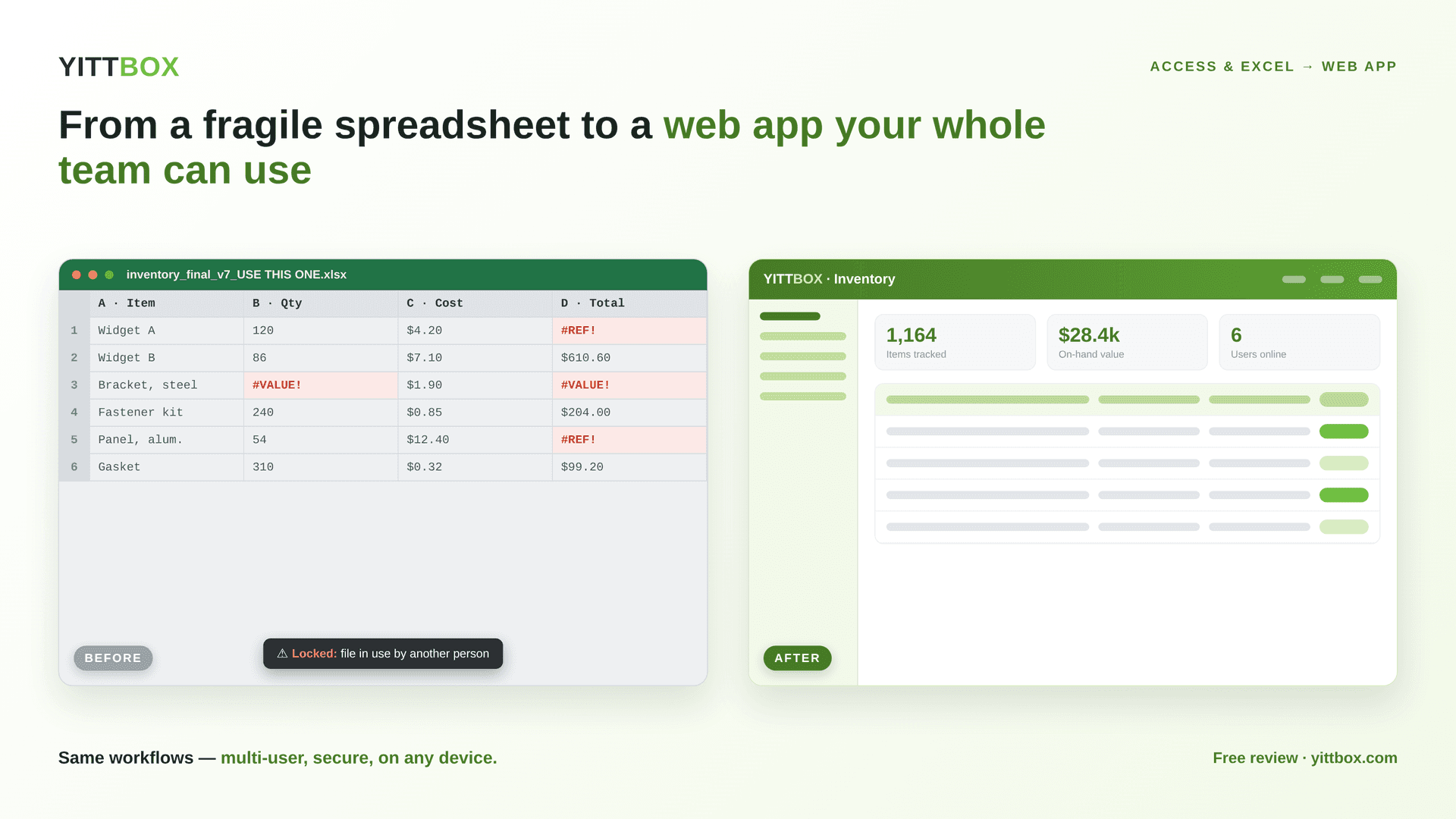
Not just happy words — real Access and Excel projects we've shipped
20+ years
Building business apps for small and mid-size companies.
Clear, up-front quotes
No surprise invoices. We scope, then quote the work.
Progress updates every week. No black boxes.
Built on a modern React/Next.js + Node + SQL Server stack on AWS
Turn your spreadsheet into a web app — right now
Drop in an Excel or CSV file and watch it become a working app preview in your browser: schema-inferred forms, a clean table, and a real Add-record button. Your file never leaves this page — nothing is uploaded.
100% in your browser — your file is never uploaded, stored, or run. Nothing leaves this page.
Is this you?
File is too big
The Access or Excel file is hitting size limits, slowing to a crawl, or corrupting on save.
Multi-user conflicts
Two people open it at once and one of them loses their work. Constant “file is locked” pop-ups.
Can’t open on Mac or phone
Sales is in the field, the warehouse is on a tablet, and nobody can get to the data.
The IT person left
The one who built it is gone, and nobody understands how it works.
Security / compliance pressure
Auditors are asking who has access, when, from where. You don’t have answers.
Version sprawl
There are six copies of the file on the shared drive and nobody knows which one is the real one.
Imagine instead…
Anywhere access
Same login from the office, home, a tablet, a customer site.
Real-time multi-user
Ten people editing the same data, no file locks, no lost work.
Mobile-responsive
Built for phone and tablet from the start — no extra app to install.
Role-based security
Sales sees sales. Finance sees finance. Admins see everything — per-user, audit-logged.
Audit trail
Every change is logged: who, what, when. Compliance ready.
Integrations
QuickBooks, Salesforce, Stripe, your warehouse system — talk to the tools you already use. Nothing to install.
Modernize your Excel or Access database
Access database modernization doesn’t mean throwing away what works. We keep the logic your business already depends on and rebuild it as a secure, multi-user web app — so the same forms, reports, and rules run in any browser, on any device, without the file locks and version sprawl. It’s the same move for an overgrown Excel workbook: we modernize the spreadsheet into a real application while keeping your data and process intact.
Same offer, whatever you're starting from
Access and Excel are two of the four reasons people end up here — the other two don't show up in a search box, so we're saying it directly.
You keep everything that works. We remove the limits.
- Your data — every record migrated, zero loss
- Your forms & screens — rebuilt as clean, familiar web pages
- Your reports — same outputs, now automated and shareable
- Your calculations & formulas — preserved exactly
- Your business rules — enforced, not lost
- Your user permissions — who can see and edit what
- Your integrations — connected to the tools you already use
- Your history — full historical records carried over
YittBox builds replacement business applications. We don’t do Excel tutoring, downloadable templates, basic Access repair, or consumer tech support.
Our streamlined 6-step process
- 1
Free System Review
Async-first. Send us your files and we’ll analyze them — no charge. We tell you what we see and what it would take, then get back to you.
- 2
Architecture & quote
We write up the architecture, data model, and integrations — then quote the work up front. No surprises.
- 3
Iterative build with weekly progress updates
You get a progress update every week, so you can course-correct early and never wait months to see where things stand.
- 4
Data migration + parallel run
We migrate your data and run the old system alongside the new one until you’re confident.
- 5
UAT
Your team runs through the new app, tests the workflows that matter, and signs off before launch.
- 6
Go-live & ongoing support
We flip the switch, monitor the rollout, and stay on call. Support is ongoing — you’re not on your own day one.
You’re in good hands
20+ years of MS Access & Excel
We’ve seen every variant of “the Access database that grew up.” Nothing surprises us.
Clear, up-front quotes
We scope, then quote the work up front — no “a few more weeks.”
Weekly progress updates
You get a progress update every week. No black boxes, no surprises at launch.
References on request
Real clients who’ve been through the conversion. Ask us, we’ll connect you.
How a web app compares
| Capability | Access / Excel file | Custom web app |
|---|---|---|
| Access from anywhere | Tied to one PC / shared drive | Any browser, any device |
| Multiple users at once | File locks, lost edits | Real-time, no conflicts |
| Mobile / tablet | No | Built-in, responsive |
| Data integrity | Corrupts, version sprawl | One source of truth, configurable backups |
| Security | One shared file/password | Role-based logins + audit trail |
| Reporting & integrations | Manual, brittle | Live dashboards + API integrations |
| Scales as you grow | Hits size/row limits | Grows with your data + users |
The cost of staying on spreadsheets
Answer four quick questions to see what the manual process costs your team each year — and roughly when a web app pays for itself.
Their rough hourly cost
How often bad data / rework bites you
How it’s calculated: hours × people × 52 weeks × hourly cost, plus a rework factor.
You’re spending roughly
$58,968/year
on this manual process.
A web app in the typical range often pays for itself in about 4 months.
Estimate — real numbers depend on your setup.
How much does a conversion cost, and how long does it take? →
Access Database Cloud Migration — Cost & ROI
What it really costs to move a Microsoft Access database to the cloud — and when it pays for itself.
Moving a Microsoft Access database to the cloud usually costs far less than teams expect — and less than the hours quietly lost to a fragile local file. Rather than per-seat enterprise licensing, you pay once to convert your Access database into a web app, then only for modest cloud hosting, so the ongoing cost stays predictable as your team grows.
Because the exact cost depends on how complex your database is, we quote it up front after a free system review — no surprise licensing tiers or per-user fees. Most Access database cloud migrations pay for themselves within the first year through the time saved on manual fixes, version conflicts, and single-user lockouts.
Most software projects land in the low-to-mid five figures and typically pay for themselves within about four months. You get a fixed quote you approve up front (no surprises), billed by milestone — or monthly for ongoing work.
What clients say
“The team is very skilled in MS Access and quickly turned around quality work. I recommend and would hire again!”
— Decisive BI, LLC
“We're an NYC not-for-profit law firm and hired the YittBox team to update our client management system and move it to Azure for remote access. The team was impeccable — their aptitude with Microsoft Access far exceeded my expectations. They get the highest marks across the board for communication and responsiveness. We'll continue to use them going forward.”
— CFAL
“Incredible. Simply put, the YittBox team exceeded our expectations at every step of the way on a very quick turnaround request. The solution they provided not only fit our specifications, but came tested, polished, with documentation, and was super-easy to use on our end. Highly recommended!”
— Full Spectrum Insights
More from the blog
Turn risky Access databases and sprawling Excel spreadsheets into secure, custom web apps.

June 30, 2026
Is Microsoft Access Being Discontinued? What It Means for Your Business
Short answer: no. But if your business now depends on an Access database, the more useful question is whether Access is still the right home for it. Is Microsof…
Read more →
June 24, 2026
Microsoft Access and HIPAA: The Honest Compliance Reality
This article is educational information, not legal or compliance advice. HIPAA compliance depends on your specific systems, data, workflows, and risk assessment…
Read more →
June 22, 2026
Access Security, Auditing & Backups: What Access Can (and Can't) Do
Security, auditing, and backups are where Access's age shows most plainly. None of what follows means Access is unsafe to use — it means its built-in tools were…
Read more →Explore the full Access library
Microsoft Access built your business — until it started holding it back: locked to one PC, no safe multi-user access, and one corruption away from downtime. YittBox turns your existing Access database into a secure, multi-user web app you reach from any browser, without losing your data or your workflows. Below is our complete Access library — from the fundamentals to migration, performance, security, and the real cost and timeline of going web.
Companies we've worked with
 UPA Diesel
 Nikz Nacks
 Rack N' Action
 Fahrenheit Heating & Air
 AMC 4000 Footer Club
 Brass Armadillo Antique Malls
 Ricky Rescue
 1128 Capital
 VALLEY CAR GROUP
 GUIDELINE TEMPLATES
 ADVANCED CRM SOLUTIONS
 WAVERITAS
 BATES CUSTOM STONE
 SOUTHERN MISFITS OFF-ROADING
 TOP TOYS THIS YEAR
 PANN TV
 Media Choice
 M&A Associates
Our promise to you
Fixed up-front quote
Approve the price before any work starts — no surprise bills.
You own everything
You own 100% of your code and data. No lock-in.
We work until it's right
We keep at it until it does what we agreed on.
Free review, no commitment
Get a real answer with no call and no obligation.
Worried about handing over your data? See how we keep it safe →
Led by Joe & Holly, Managing Partners — meet the team →
Last updated July 13, 2026
Who can convert an Access database to a web app for a small business?
YittBox converts Microsoft Access databases into modern, multi-user web apps for small and mid-size businesses — keeping the logic and data you rely on while removing the single-PC, single-user, and corruption limits. Send your .accdb/.mdb file and we run a free system review, then give you a fixed, up-front quote before any work starts. With 20+ years in Access and an AI-accelerated build process (RalphAI), we deliver faster and for less than a traditional agency — expert-level work without enterprise-consulting rates.
How do I turn an Excel spreadsheet into a web app?
To turn an Excel spreadsheet into a web app: (1) send us the file, (2) we map your sheets, formulas, and workflows in a free review, (3) we rebuild it as a secure, multi-user web app you reach from any browser — with the same logic your team already knows, minus the version conflicts and broken formulas. YittBox quotes the work up front at a fixed price; most spreadsheet conversions ship in weeks, not months.
How long does it take to build a custom business web app?
Most small-to-mid-size business web apps take a few weeks to a few months, depending on scope — a focused Access/Excel conversion is on the faster end, a multi-module system on the longer end. YittBox scopes and quotes your timeline up front (free review), and RalphAI-accelerated delivery shortens it versus a traditional shop. You get the timeline in writing before work begins — no open-ended hourly billing.
Is Microsoft Access being discontinued? Is Access “dead”?
Microsoft Access is not discontinued — it ships with Microsoft 365 and is still supported — but many businesses outgrow it: it's limited to one file, struggles with multiple simultaneous users, and has no real mobile access. When you hit those limits, the fix isn't abandoning your logic — it's modernizing it. YittBox moves Access apps to multi-user, mobile-friendly web apps while preserving your data and business rules, with a free review and an up-front quote.
Frequently asked
What does it cost?
We provide a quote after we review your files. Every project is scoped to your data, users, and integrations.
How long does it take?
Most projects ship in 6–12 weeks from scoping. The exact timeline is in your quote — no “a few more weeks.”
Will we lose data?
No. We migrate your data into the new system and run the old system in parallel until you’ve verified everything against the new one. Nothing flips until you sign off in UAT.
Can we keep using Access during the transition?
Yes. During the parallel-run phase your team keeps working in Access or Excel exactly like today. We only ask you to switch over after UAT.
Do you sign NDAs?
Yes. Mutual NDA is standard before we look at your file. Send us yours or we’ll send you ours.
What about my existing reports?
Reports come over. We rebuild them in the new web app so they render in a browser and export to PDF/Excel on demand. The numbers stay the same.
How much does it cost to convert a Microsoft Access database to a web app?
Most Access-to-web-app projects land in the low-to-mid five figures, depending on size, complexity, and how clean the data is. Send your file for a free review and an up-front quote, or get an instant ballpark from our estimator.
Is Microsoft Access being discontinued?
No — Access is still part of Microsoft 365 and supported. Teams move off it not because it is going away, but because it hits limits on multi-user access, mobile, scale, and the “only one person understands it” risk.
How do I convert an Excel spreadsheet into a web application?
You move the same logic into a web app backed by a real database: we review the workbook, rebuild the calculations as a multi-user app, migrate your data, and you validate before go-live.
How long does it take to convert Access or Excel to a web app?
Most projects take a few weeks to a few months, depending on size and complexity. You keep using your current file during the build, and a free review gives a realistic timeline up front.
Access or Excel vs a web app — which is better?
For one person a spreadsheet is fine; for a team a web app wins on multi-user access, backups configured to your needs, mobile access, security, and an audit trail — with no single point of failure. The trade-off is the upfront investment.
Get a free system review
Three quick steps. No call required — send what you have and we'll analyze it and reply within one business day.
- NDA on request
- Your file is never shared
- Reply within one business day
- No obligation
- You own your source code — no proprietary platform lock-in
- NDA available before you share anything
- Secure, staged migration — you review and approve at each step
- Full data-validation process — nothing goes live unverified
- Post-launch support options
Not ready to send your file yet? Try the free Access Database Scanner or the Excel Workbook Analyzer.